Nothing interrupts a great movie night or an important video call quite like a sudden drop in internet speed. If you still rely on an older 4G LTE connection, you might notice buffering, lagging, and frustrating delays. Upgrading to a 5G Globe SIM card changes the way you experience the digital space.
By making the switch to 5G, you unlock blazing-fast download speeds, ultra-low latency, and a significantly more reliable connection. Whether you want to stream high-definition videos without buffering, dominate in competitive mobile gaming, or simply browse the web with instant page loads, a 5G connection delivers on all fronts.
In this comprehensive guide, we will walk you through the exact process of upgrading your network. You will learn how to check if your current SIM card is already 5G-ready, how to request a seamless upgrade from Globe, and exactly what to do once your new SIM card arrives.
The Core Benefits of a Globe 5G SIM Upgrade
Before diving into the upgrade process, you should understand exactly what you gain by making the switch to 5G. The fifth generation of mobile network technology is not just a minor update; it represents a massive leap forward in connectivity.
Experience Blazing-Fast Speeds
The most noticeable benefit of a 5G Globe SIM card is raw speed. 5G networks can deliver download speeds that are up to 10 to 100 times faster than standard 4G networks. This means you can download entire high-definition movies in a matter of seconds. App updates, large email attachments, and heavy software files finish downloading almost instantly.
Enjoy Ultra-Low Latency
Latency refers to the time it takes for data to travel from your device to a server and back again. High latency causes that annoying lag you experience during video calls or online gaming. 5G significantly reduces latency to nearly zero. This ultra-low latency ensures your video calls remain crystal clear and perfectly synced. Gamers will notice a massive advantage, as their reaction times register immediately without network delay.
Benefit from Superior Network Capacity
Have you ever tried using your mobile data at a crowded concert, sporting event, or busy mall, only to find that pages will not load? 4G networks often struggle with congestion when too many devices connect to the same cell tower. 5G technology solves this problem by offering vastly increased network capacity. Your Globe 5G SIM card ensures a stable, strong connection even in densely populated areas.
Step 1: Check if Your Current SIM and Device Are 5G-Ready
Before you request a new SIM card, you need to verify if your current setup already supports 5G. Many newer Globe SIM cards already come 5G-enabled out of the box.
Inspect Your Physical SIM Card
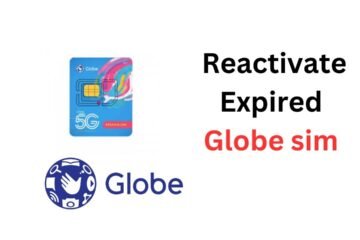
The easiest way to check your SIM card is to take it out of your phone and look at it. Carefully remove your SIM tray and inspect the printed design on the card. Most modern Globe SIM cards that support 5G explicitly display the “5G” logo on the plastic. If you only see “LTE” or “3G,” you definitely need an upgrade.
Check Device Compatibility
A 5G SIM card will only provide 5G speeds if you use it inside a 5G-capable smartphone. You can easily check your phone’s capabilities through its settings.
For Android users:
- Open your device Settings.
- Tap on Connections or Network & Internet.
- Select Mobile Networks.
- Tap on Network Mode. If your phone supports 5G, you will see an option that says “5G/LTE/3G/2G (auto connect)” or similar.
For iOS users:
- Open Settings.
- Tap on Cellular or Mobile Data.
- Select Cellular Data Options.
- Tap on Voice & Data. If you see options for “5G Auto” or “5G On,” your iPhone is ready for 5G.
Verify 5G Coverage in Your Area
You also need to ensure that your home, office, or frequently visited areas have Globe 5G coverage. You can visit the official Globe website and check their updated 5G coverage map. Globe continuously expands its 5G network across key cities and provinces, so coverage improves rapidly.
Step 2: Request Your Globe 5G SIM Upgrade
Once you confirm that you need a new SIM card and possess a compatible device, you can proceed to request your upgrade. Globe provides several convenient methods to get your new 5G SIM.
Upgrade via the GlobeOne App
The most convenient way to manage your Globe account is through the official GlobeOne app.
- Download and install the GlobeOne app from the Google Play Store or Apple App Store.
- Register or log in using your current Globe mobile number.
- Navigate to the Help or Account Requests section.
- Look for the option to upgrade your physical SIM card.
- Follow the on-screen prompts to request a 5G SIM replacement. Globe will usually ship the new SIM directly to your registered address.
Visit a Globe Physical Store
If you prefer a hands-on approach or want your new SIM card immediately, you can visit any Globe Store.
- Locate the nearest Globe Store in your area.
- Bring your current active SIM card and your 5G-capable smartphone.
- Bring at least one valid government-issued ID for verification.
- Approach a customer service representative and request a 5G SIM upgrade.
- The representative will process your request, transfer your existing mobile number to the new 5G blank SIM, and hand it to you right then and there.
Step 3: What to Do After Receiving Your New 5G SIM
Getting your hands on the new 5G SIM card is only half the process. You need to properly activate and set up the SIM to enjoy those lightning-fast speeds.
Insert the New SIM Properly
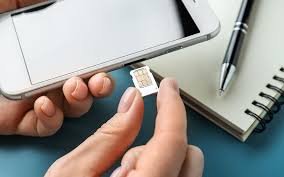
First, power off your smartphone entirely. Use a SIM ejector tool to open the SIM tray. Remove your old SIM card and carefully place the new 5G Globe SIM into the slot. Ensure the gold contacts face the correct direction according to your phone’s tray layout. Slide the tray back in and power on your device.
Register Your SIM Card
If you purchased a brand new prepaid 5G SIM card, Philippine law requires you to register it before you can use it. Visit the official Globe SIM Registration portal online. Enter your new mobile number, provide your personal details, upload a photo of your valid ID, and take a selfie for verification. Wait for the confirmation message indicating successful registration. (If you upgraded an existing postpaid line, your details are already registered).
Configure Your Network Settings
Once your phone boots up and detects the SIM, you need to ensure your network settings prefer 5G.
Go back into your phone’s network settings (using the steps outlined in Step 1). Make sure your preferred network type is set to “5G Auto” or “5G/LTE.” This setting allows your phone to automatically connect to the 5G network whenever it is within range.
Troubleshooting Common Upgrade Issues
Sometimes, technology hiccups happen. If you encounter issues while trying to upgrade or use your new 5G Globe SIM card, try these effective troubleshooting steps.
No Signal After Inserting the New SIM
If your phone shows “No Service” or zero signal bars after inserting the new SIM, do not panic. First, try restarting your phone. Sometimes the device simply needs a reboot to properly read the new network configurations.
If restarting does not work, toggle Airplane Mode on for 30 seconds, then turn it off. This forces your phone to actively search for the nearest cell tower and reconnect to the Globe network.
Phone Connecting to 4G Instead of 5G
If you see an “LTE” or “4G” icon instead of “5G” on your status bar, several factors might be at play. First, double-check your network settings to ensure 5G is selected as the preferred network type.
Next, verify that you are actually in a 5G covered area. If you step inside a building with thick concrete walls, the 5G signal might drop, causing your phone to automatically switch to the more penetrating 4G signal. Step outside or move closer to a window to see if the 5G icon returns.
Delays in Number Porting or Activation
If you requested a SIM replacement retaining your old number, the transfer process usually takes a few minutes to a few hours. Keep your old SIM card handy. Wait until the old SIM completely loses its signal before inserting the new 5G SIM. If 24 hours pass and your new SIM still has no service, contact Globe customer support through the GlobeOne app or their official social media channels to expedite the activation.
Make the Switch to Globe 5G Today
Upgrading to a 5G Globe SIM card acts as your direct passport to a superior digital lifestyle. You eliminate frustrating lag, secure a more reliable connection in crowded places, and unlock download speeds that change how you consume media on the go.
The upgrade process takes very little time but yields daily benefits for your personal and professional connectivity. Do not settle for buffering videos and dropped connections. Check your device compatibility, request your new 5G SIM through the GlobeOne app or your nearest Globe Store, and step into the future of mobile internet today. Upgrade now and experience the connection you truly deserve!